
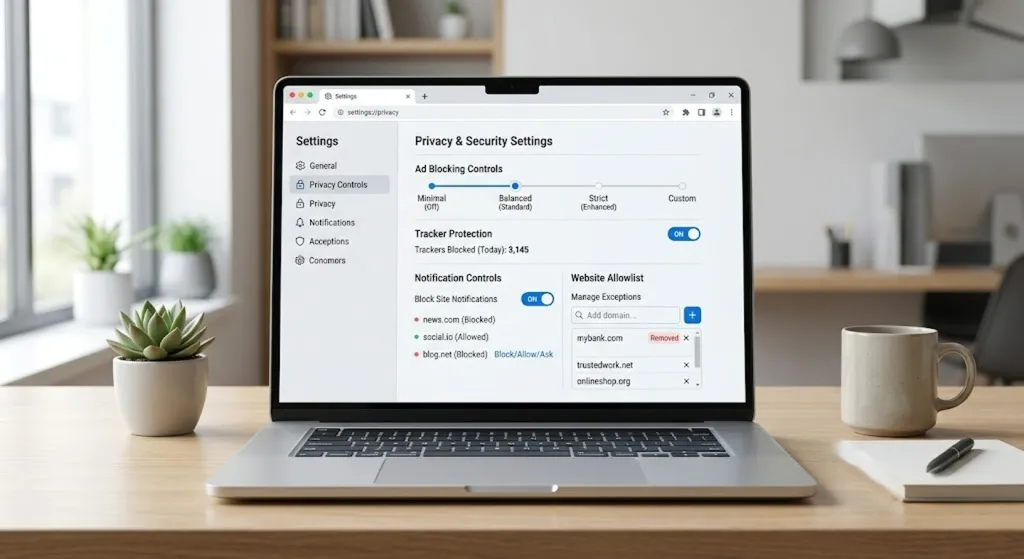
That's the quiet reality of the modern web, and it's why so many people have started reshaping how pages reach them rather than accepting whatever loads. A Chrome ad blocking extension is the usual fix. It's a small add-on that sits inside your browser and trims the ads, pop-ups, and trackers on the pages it supports — without changing the sites themselves or how you already browse. This article walks through why people bother, what actually separates a useful blocker from a forgettable one, and how Total Adblock stacks up against that bar.
The Real Reason Pages Feel So Busy
A webpage isn't one thing anymore. It's a bundle assembled the instant you arrive, and only part of it is the content you clicked for. The rest arrived because it serves someone's purpose — revenue, analytics, a sale, a re-engagement nudge.
Run through what you actually meet on a typical page and the list gets long fast: display advertisements packed into the margins, pop-up windows that surface before you've read a line, autoplay videos that start talking on their own, notification prompts from sites you may never revisit, promotional banners angling for a click, and third-party trackers taking quiet notes on where you head next.
Here's the fair part, though. None of that is villainy. Advertising keeps an enormous slice of the web free to read, and plenty of writers and creators depend on it to keep publishing. The friction isn't that these elements exist — it's the density. When the supporting cast starts talking over the main act, browsing turns into a low-grade chore, and that's the moment people go looking for a little more control.
What Actually Makes an Ad Blocker Worth Keeping
Plenty of blockers get installed and quietly removed a week later. Usually that's because the tool did too little to matter, or too much and broke the sites you liked. The ones people keep tend to share a handful of traits — and it's worth knowing them before you install anything.
Ad blocking is the headline, but on its own it rarely earns permanent space. The features around it do the real work:
- Pop-up reduction — since interruptions do their damage in the opening seconds on a page
- Tracker management — trimming what follows you quietly from one site to the next
- Notification controls — an end to the “Allow alerts?” prompts that seem to multiply the more you browse
- Adjustable preferences — so you set the intensity yourself instead of living with one fixed mode
- Chrome integration that installs cleanly and then fades into the background
And then there's the feature that separates a blunt instrument from a considered one: allowlists. This lets you keep ads switched on for the publishers you genuinely want to fund, turning “block everything” into “block on my terms.” It's a small thing that means cutting clutter never has to mean cutting off work you value.
Read that list and a theme surfaces. The goal isn't to block more — it's to block smartly, with room to make exceptions.
Where Total Adblock Fits In
Measured against that standard, Total Adblock is one Chrome Web Store extension worth a closer look — particularly if Chrome is the browser you open first each day.

According to its official product listing, it's built to reduce many online advertisements, manage pop-ups, and block a range of third-party trackers on the sites it supports. Instead of a single on-or-off switch, it uses customizable presets, so you decide how forcefully it works rather than accepting a fixed default. Alongside that, you can build allowlists for the sites you'd rather support, and handle browser notifications from inside the extension itself instead of chasing them across menus.
On cost, the listing describes a 7-day premium trial, after which an optional subscription is available for anyone who wants more. What you unlock depends on the plan you choose, so it's sensible to confirm what a given tier actually covers before committing — the feature set isn't identical across the board.
Cutting clutter never has to mean cutting off work you value.
Get the AppIs It Right for How You Browse?
This is where honesty beats a sales pitch. A tool like this isn't universally necessary, and whether it earns its place depends almost entirely on how much time you spend in a browser and how much the clutter grates.
Some people feel it sharply. A student reading through source after source notices every interruption. So does a remote professional with a wall of tabs open from morning to night, a researcher hunting for one fact buried under promotional filler, or a shopper comparing prices across half a dozen retailers. News readers skimming between other tasks feel it too, as do home users on a shared family computer where everyone's browsing piles up in one place.
The most reliable test isn't a checklist — it's your own afternoon. If you catch yourself closing the same pop-ups on the same sites, over and over, a tool like this has something concrete to offer. If you barely register the noise, you may genuinely be fine without one. There's no wrong answer here, only an honest match between the tool and your routine.
A Few Checks Before You Install
The classic mistake is grabbing the first blocker you see and hoping for the best, then peeling it off days later when it doesn't fit. A short round of scrutiny upfront spares you that detour. Before you commit, it's worth weighing:
- Browser compatibility — that it works properly with the browser you actually use
- Developer privacy information — what's stated about the data it handles, and whether that sits right with you
- Customization options — how much real say you get over what's blocked
- Allowlisting features — so you can keep supporting the sites you choose
- Subscription choices — the pricing, and what each tier genuinely covers
- Ongoing updates and support — a sign the tool is still being maintained rather than left to drift
Run through those and you'll choose with your eyes open, rather than gambling on a name you half-recognized.
